wekanteam/wekan
Open-Source kanban
10M+
wekanteam/wekan repository overview
WeKan ® - Open Source kanban
Downloads
Screenshot
About WeKan ®
WeKan ® is a FLOSS collaborative kanban board application with MIT license.
Whether you’re maintaining a personal todo list, planning your holidays with some friends, or working in a team on your next revolutionary idea, Kanban boards are an unbeatable tool to keep your things organized. They give you a visual overview of the current state of your project, and make you productive by allowing you to focus on the few items that matter the most.
Since WeKan ® is a free software, you don’t have to trust us with your data and can install Wekan on your own computer or server. In fact we encourage you to do that by providing one-click installation on various platforms.
- WeKan ® is used in most countries of the world.
- WeKan ® largest user has 30k users using WeKan ® in their company.
- WeKan ® has been translated to 234 languages, 167 of them essentially complete.
- Features:
- Real-time user interface
- All Boards page, Drag drop reorder with one or Multi-Selection:
- Board icons at Remaining, (Sub)Workspaces, Archive
- Shared Templates: Boards, Lists, Cards
- Add Board / Import:
- WeKan JSON/.zip, CSV/TSV, Excel, Markdown, Leo, todo.txt
- Trello, Jira, Trello, Asana, Zenkit, Focalboard
- Kanboard, Nextcloud Deck, OpenProject, Taskwarrior
- GitHub, GitLab, Gitea, Forgejo
- Change Color: Board theme and background image, Swimlane, List, Card
- Overrides: 1 Admin Panel, 2 Board Settings, 3 Member Settings
- Drag drop reorder with one or Multi-Selection:
- Board icons to Workspaces at All Boards page
- Swimlane, List, Minicard
- Board
- Top header: Mobile/Desktop view, Show/Hide Drag Handles, Starred Boards Bookmarks, Sort Boards, Filter, Search, Notifications, Member Settings
- Member Settings:
- Show My Dependencies, Show Board Dependencies, Import/Export JSON/SVG
- Dependencies are for SAFe PI Plannings, drawing colored lines between cards, like Kendis or Scaled Agile Framework. Import Export as JSON and SVG.
- My Cards, Due Cards, My Attachments, Search All Boards, Date Settings, Change color - override theme, Nofications Settings (Tray, Email, etc), Font change and Font size change, Change Avatar, Change Language (250+ languages)
- Change Settings: Show desktop drag handles, Submit editors with Enter, Open many cards at once, Play a sound when a checklist item is completed, Show cards count if list contains more than ... cards, Show rescue dialoque before closing for unsaved card descriptions
- Show My Dependencies, Show Board Dependencies, Import/Export JSON/SVG
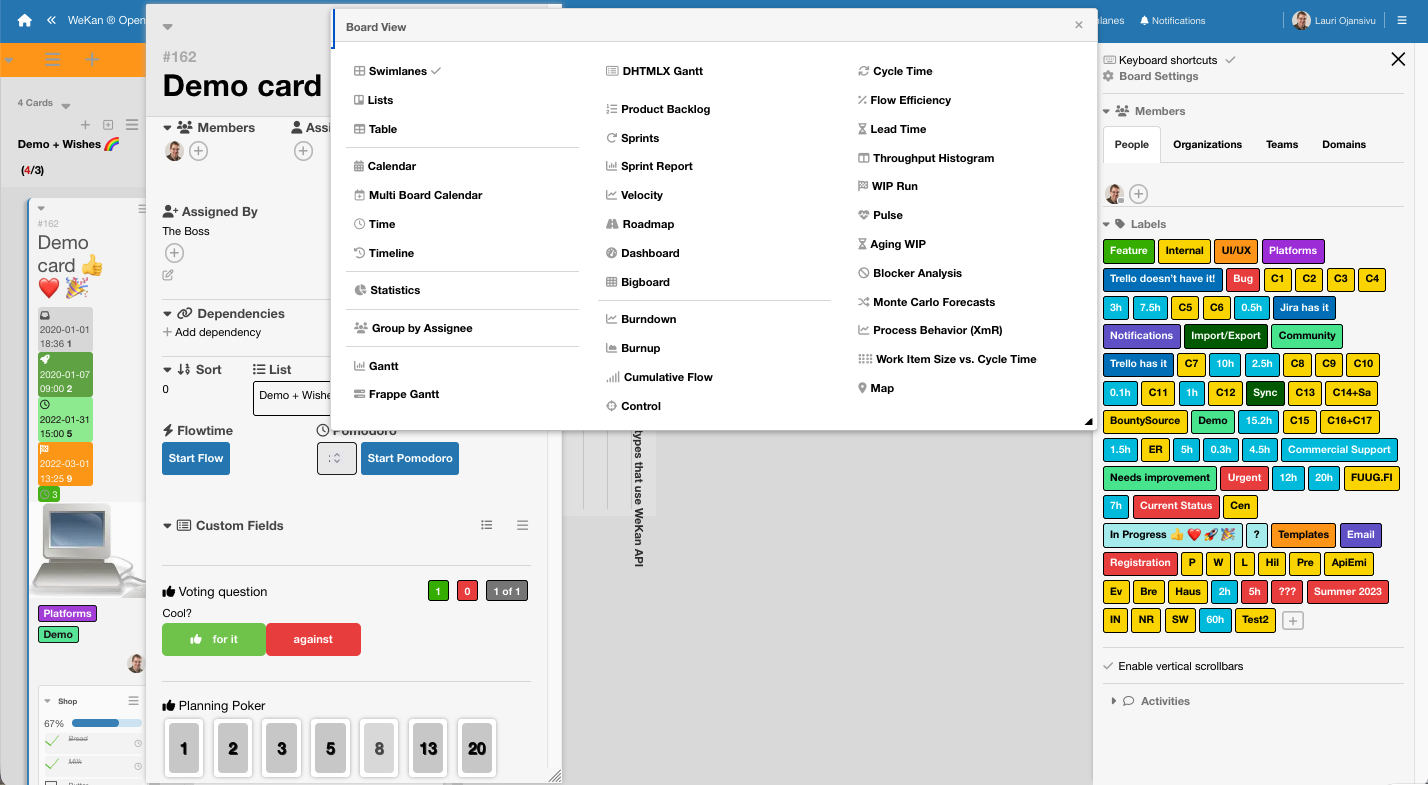
- Board Views:
- Swimlanes, Lists
- Minicard: At list there is card, that has not been not opened yet
- Card: Opened card popup of minicard
- Attachments viewer for PDF and Office documents
- Drag drop reorder one or Multi-Selection: Swimlanes, Lists, Minicards, Checklists, Checklist Items
- Collapse/Uncollapse: Menus, Swimlanes, Lists, Cards
- Table, Calendar, Multi Board Calendar, Time, Timeline
- Statistics, Group by Assignee
- Gantt, Frappe Gantt, DHTMLX Gantt
- Scrum: Product Backlog, Sprints, Sprint Report, Velocity, Roadmap, Dashboard, Bigboard
- Burndown, Burnup, Cumulative Flow, Control, Cycle Time, Flow Efficiency, Lead Time, Throughtput Histogram, WIP Run, Pulse, Aging WIP, Blocker Analysis, Monte Carlo Forecasts, Process Behavior (XmR), Work Item Size vs Cycle Time, Map
- Right Sidebar / Board Settings:
- Rules: like IFTTT like Trello Butler
- Lists view for Rules
- Workflow view: like Jira Workflows
- Blocks: like Scratch or Jira AutoBlocks, shows same IFTTT Rules
- Import / Export IFTTT Rules
- Export board :
- Select what to include: Card details, Board, Activities, Labels, People (Creator, Owner, Members, Assignees), Board Info (Board, List, Swimlane), Dates (Created, Received, Start, Due, End), Description, Custom Fields, Checklists, Subtasks, Comments, Attachments, Votin, Plannin Poker, Stickers, Location (link to map based on coordinates), Dependencies, Sort, Scrum Settings
- Export to: PDF, Excel, HTML, Calendar feed (iCal), Dependencies JSON/SVG, CSV , ; TSV, JSON with/without attachmeents, .zip (Attachments), Kanboard, Markdown, Leo, todo.txt, Taskwarrior, Focalboard, Trello, Jira, NextCloud Deck, OpenProject, GitHub, GitLab, Gitea, Forgejo, Asana, Zenkit
- Scrum Settings
- Change color theme, Change Background Image, Date settings
- Settings:
- Board View: Show/Hide and drag drop reorder what is shown atat Public Board and Private Board
- Swimlane: Scrum settings, Lock resize swimlane height, WIP Limit Groups
- Board View: Show/Hide and drag drop reorder what is shown at Minicard and Card
- Admin Panel
- Settings
- Version
- Visibility: What is shown/hidden, Whitelabeling
- Announcement
- Accessibility
- Translation: Add custom translation strings
- PWA
- Global Webhooks
- Settings
- People
- Email, Notifications, Domains, Organizations, Teams, People
- Locked Users, Roles, Shared Templates
- Login, SAML, LDAP, OAuth2 login providers, Passwordless login
- Attachments
- Scheduled Backups, Continuous realtime backups, Move Attachments, Default Save Storage, Limits
- Storage: MongoDB GridFS, Filesystem, S3/MinIO, Azure Blob, Google Cloud
- Database migration
- Problems
- Summary
- Security
- Delete: Optional enable permanent delete.
- History Undo/Redo available at Board, List, Card, etc menus at Swimlanes and List views
- Notifications
- Reports
- Security: shows any attempted attacks based on names from https://wekan.fi/hall-of-fame/ like built-in SIEM with country flag and city based of location of IP address based on location headers like CloudFlare etc
- Impersonation
- Performance, Speed, Tests, CPU usage, Instrumentation, Broken Cards, Files, Rules, Boards, Recovery, Offices, API, Database problems, Filesystem integrity
- Platforms:
Docker Containers
image: ghcr.io/wekan/wekan:latest
image: wekanteam/wekan:latest
image: quay.io/wekan/wekan:latest
docker-compose.yml at https://github.com/wekan/wekan/blob/main/docker-compose.yml
Standards
- WeKan and Standard for Public Code assessment was made at 2023-11. At 2026 WeKan becameß full FLOSS with FerretDB v1 Fork, also see 2026 talk WeKan 10 years at https://wekan.fi/docs for more details. Currently Wekan meets 9 out of 16 criteria out of the box. Some others could be met with small changes.
Code stats
Translate WeKan ® at Transifex
Translations to non-English languages are accepted only at Transifex using webbrowser. New English strings of new features can be added as PRs to master branch file wekan/imports/i18n/data/en.i18n.json .
WeKan ® feature requests and bugs
Please add most of your questions as GitHub issue: WeKan ® Feature Requests and Bugs. It's better than at chat where details get lost when chat scrolls up.
Discussions
FAQ
NOTE:
- Please read the FAQ first
- Please don't feed the trolls and spammers that are mentioned in the FAQ :)
Requirements
- 1 GB RAM minimum free for WeKan ®. Production server should have minimum total 4 GB RAM. For thousands of users, for example with Docker: 3 frontend servers, each having 2 CPU and 2 wekan-app containers. One backend wekan-db server with many CPUs.
- Enough disk space and alerts about low disk space. If you run out of disk space, MongoDB database gets corrupted.
- SECURITY: Updating to newest WeKan ® version very often. Please check you do not have automatic updates of Sandstorm or Snap turned off. Old versions have security issues because of old versions Node.js etc. Only newest WeKan ® is supported. WeKan ® on Sandstorm is not usually affected by any Standalone WeKan ® (Snap/Docker/Source) security issues.
- Reporting all new bugs immediately. New features and fixes are added to WeKan ® many times a day.
- Backups of WeKan ® database once a day minimum. Bugs, updates, users deleting list or card, harddrive full, harddrive crash etc can eat your data. There is no undo yet. Some bugs can cause WeKan ® board to not load at all, requiring manual fixing of database content.
Roadmap and Demo
Roadmap - Public read-only board at WeKan ® demo.
- There are many companies and individuals contributing code to WeKan ®, to add features and bugfixes many times a day.
- Please add Add new Feature Requests and Bug Reports immediately.
- Commercial Support.
We also welcome sponsors for features and bugfixes. By working directly with WeKan ® you get the benefit of active maintenance and new features added by growing WeKan ® developer community.
Getting Started with Development
The main branch uses Meteor 3.x with Node.js 26.x. See CHANGELOG.md for the latest runtime updates.
To contribute, create a fork and run ./build.sh (or ./build.bat on Windows) as detailed here. Once you're ready, please test your code and submit a pull request (PR).
Please refer to the developer documentation for more information.
First-Time Setup for Development
Prerequisites
Before building WeKan from source, ensure you have:
- Git - for cloning the repository
- Node.js 26.x - WeKan requires Node.js 26.x
- Meteor - the JavaScript framework WeKan is built with
Building WeKan
The build.sh script shows a two-level menu. The top level groups options into categories:
1) Setup 2) Dev server 3) Tests 4) Docker 5) Tools 6) Quit
You pick a category number, then the item number inside it (each submenu also has a Back entry). Building from source is a three-stage process:
- Setup -> Install dependencies - Downloads all required Meteor packages and npm modules
- Setup -> Build WeKan - Compiles the application
- Dev server -> localhost:3000 - Starts the development server at http://localhost:3000
# Clone your fork
git clone [email protected]:YOUR_USERNAME/wekan.git
cd wekan

# Make the script executable
chmod +x build.sh

# Step 1: Install dependencies (Setup -> Install dependencies)
./build.sh
# Press 1 (Setup) and Enter, then 1 (Install dependencies) and Enter

# Step 2: Build WeKan (Setup -> Build WeKan, after dependencies complete)
./build.sh
# Press 1 (Setup) and Enter, then 2 (Build WeKan) and Enter

# Step 3: Run WeKan in development mode (Dev server -> localhost:3000)
./build.sh
# Press 2 (Dev server) and Enter, then 1 (localhost:3000) and Enter
If a dev server is already running on that port, the Dev server options stop it automatically and start a fresh server on the same port.
WSL Users
WSL users can use Snap. See install docs.
License
WeKan ® is released under the very permissive MIT license, and made with Meteor.
Tag summary
Content type
Image
Digest
sha256:60f4ee534…
Size
359.1 MB
Last updated
about 7 hours ago
docker pull wekanteam/wekanThis week's pulls
Pulls:
21,935
Sep 28 to Oct 4